A network management card
- UPS and card
- Management network
- MayaUPS
MayaUPS polls the card over SNMP v1, v2c or v3, with SNMPv3 encryption. APC Galaxy three-phase units can also be read over Modbus TCP.
SNMP UPS monitoring
FEATURES
Monitoring, alarms, battery planning, service records and ordered shutdown for UPS, PDUs, transfer switches and sensors from every major manufacturer.
PRODUCT TOUR
Five screens, from the fleet to battery planning. Sample data.
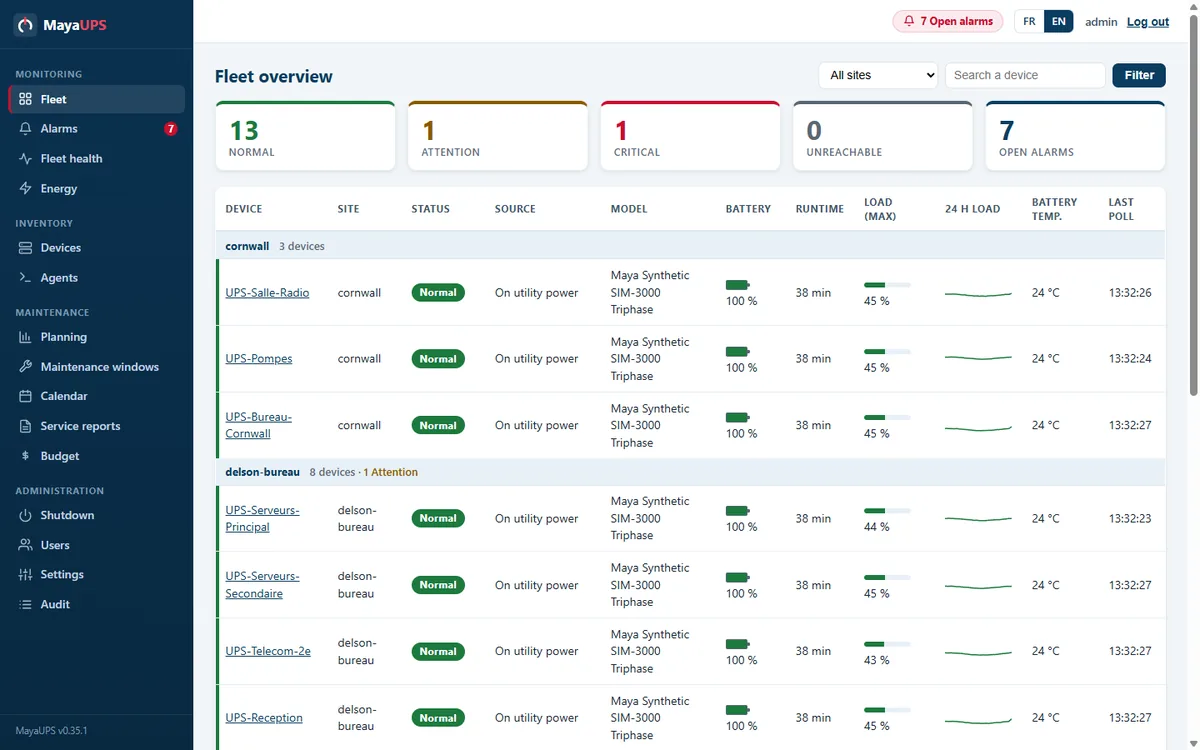
Fleet
The fleet view shows status, battery capacity, remaining runtime and load for each UPS, grouped by site, whatever the brand.
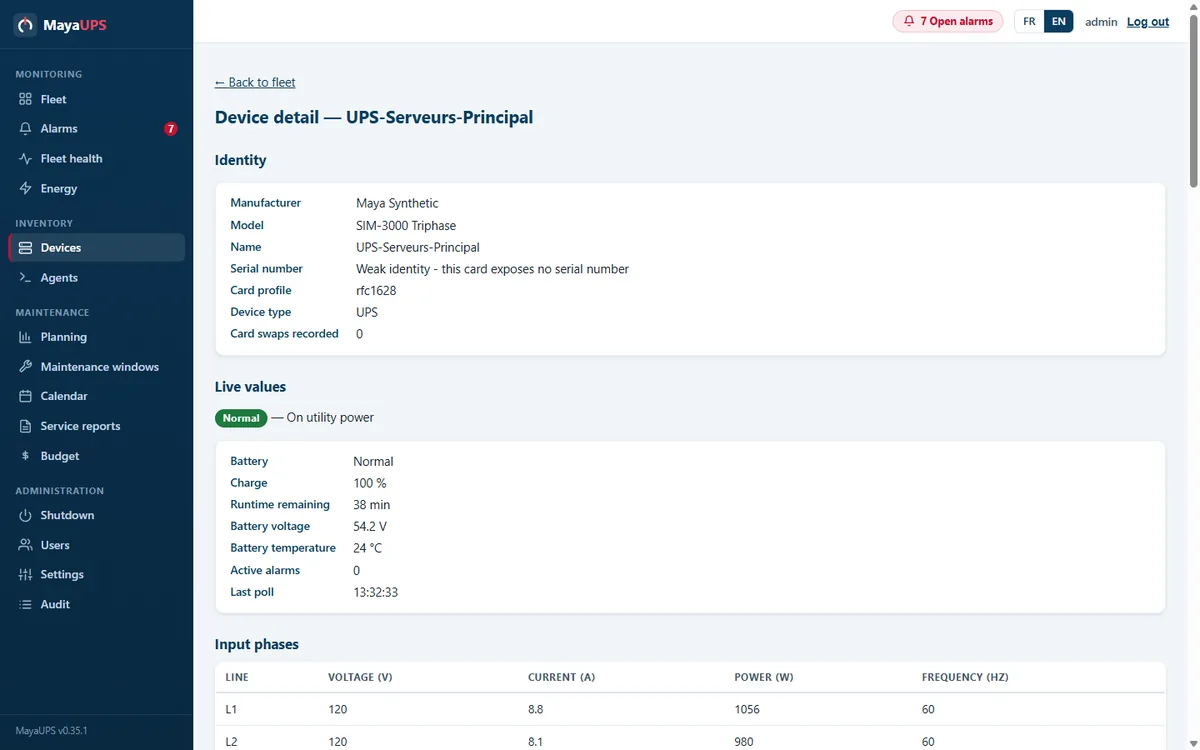
Device
Identity, live readings, per-phase values and history over 24 hours, 7 days or 30 days, on one page.
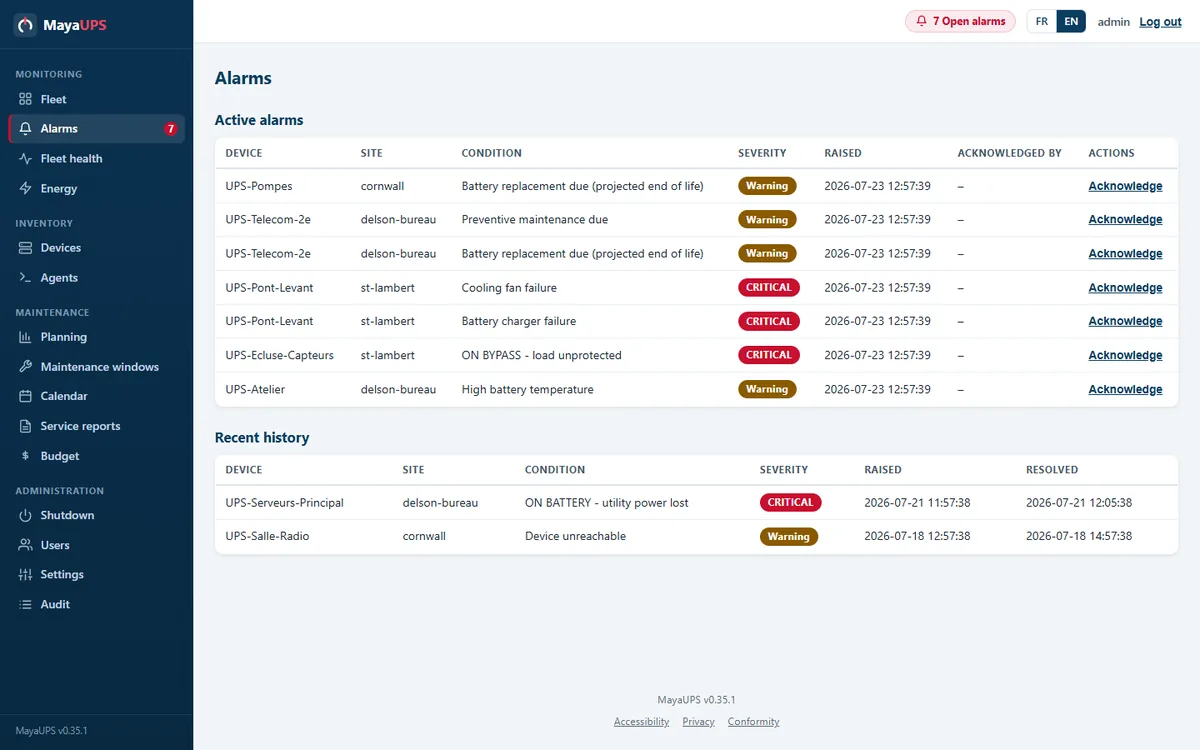
Alarms
Related events are grouped into one incident with its severity and start time. Acknowledgement shows who is responding, and escalation follows what stays open.
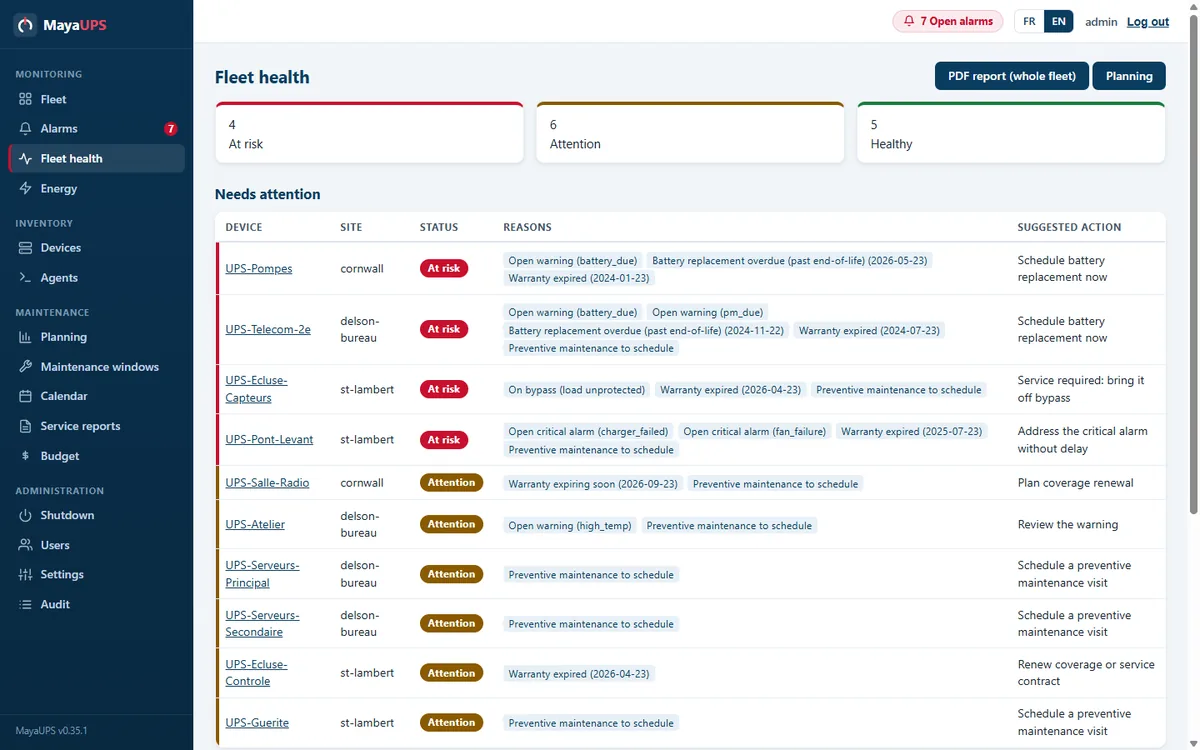
Batteries
Fleet health gives the reason behind each status: battery age above threshold, temperature, failed self-test or a replacement due soon.
Planning
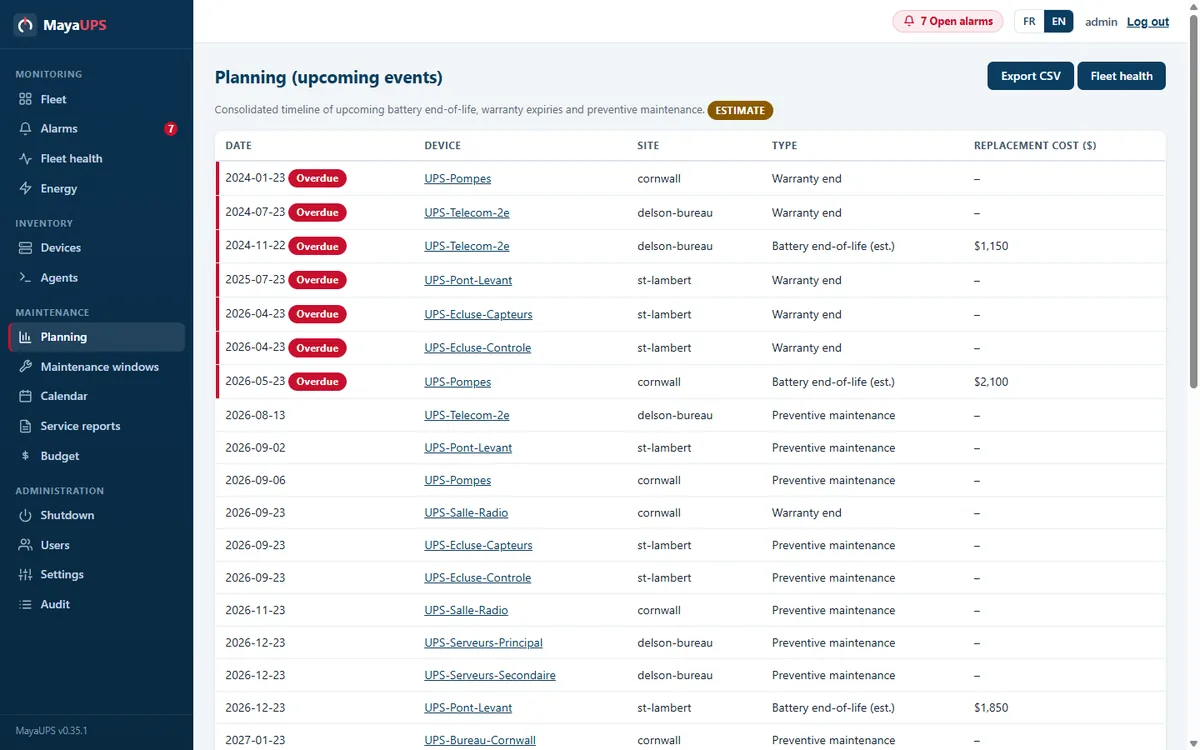
The timeline brings battery replacements, warranty dates and preventive maintenance into one schedule, with a multi-year budget.
ONE OUTAGE, FROM FLEET TO HISTORY
A power failure, from the first warning to utility power restored. Sample data.
01
The fleet view flags UPS-Serveurs-Principal in red, with its remaining runtime and reading time.

02
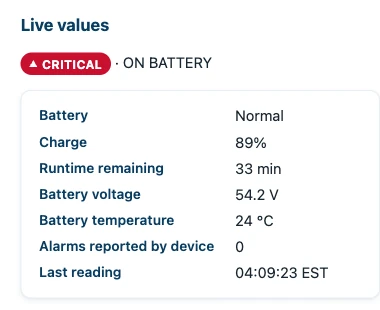
The device page shows charge, remaining runtime and the last reading as they change.
03
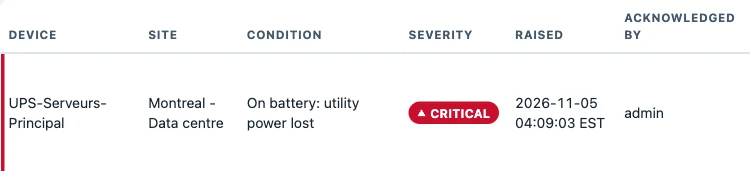
The operator acknowledges the alarm. The whole team sees who is responding, and escalation stops.
04
When utility power returns, the alarm closes on its own. History keeps the start, the end and the acknowledgement of the event.

YOUR EQUIPMENT
MayaUPS reads UPS, PDUs, automatic transfer switches and environmental sensors from the major manufacturers. Each page lists the supported models, network cards and commands.
MayaUPS polls the card over SNMP v1, v2c or v3, with SNMPv3 encryption. APC Galaxy three-phase units can also be read over Modbus TCP.
SNMP UPS monitoringThe Windows or Linux agent reads a UPS attached over USB-HID or Megatec/Q1 serial and adds it to the fleet like any network device.
Deploy MayaUPSThe fleet view shows every UPS, grouped by site, with its status, battery capacity, remaining runtime and load. Add equipment by hand, from a CSV file or by scanning the network.
Each device page shows identity, live readings and per-phase values for three-phase units. History covers 24 hours, 7 days and 30 days, with energy rollups and CSV export.
Related events become one incident with a severity, a start time and a return to normal. Acknowledgement shows who is responding; escalation and on-call schedules follow what stays open.
MayaUPS follows battery age, temperature, self-tests and runtime history. It forecasts each replacement and rolls warranties and preventive maintenance into one timeline with a multi-year budget.
Visits, notes, parts and battery serial numbers stay with each UPS. Technicians issue service reports as PDF, and published reports also appear in MayaUPS Cloud.
Shutdown events protect Windows and Linux servers, VMware, Hyper-V, Nutanix, Proxmox, XenServer and OpenShift virtualization, and NetApp, TrueNAS and DataCore storage. Each event runs in the order you set and within the runtime you have.
Once utility power is stable, MayaUPS restores UPS output and restarts servers and clusters. Physical servers power on through their BMC (Redfish) or Wake-on-LAN. Each UPS’s own power-return settings are shown next to the sequence.
Rack PDUs, automatic transfer switches and environmental sensors appear in the same fleet as the UPS. That includes APC rack PDUs, ATS and NetBotz, Eaton ePDU and ATS, CyberPower ATS and PDUs, Tripp Lite PDUs and EnviroSense, and Vertiv Geist.
Viewer, operator and administrator roles separate who watches, who responds and who configures. Sign in with local accounts, LDAP and Active Directory or RADIUS, with two-step codes. Every change is recorded in the audit history.
THE RECORD AFTER A VISIT
The unit, the work performed, the readings and the technician’s observations, on one page.
Sample data
Report SR-2026-0142 covers an APC Smart-UPS SRT 6000 at Montreal - Data centre, in good condition.
Download the report PDF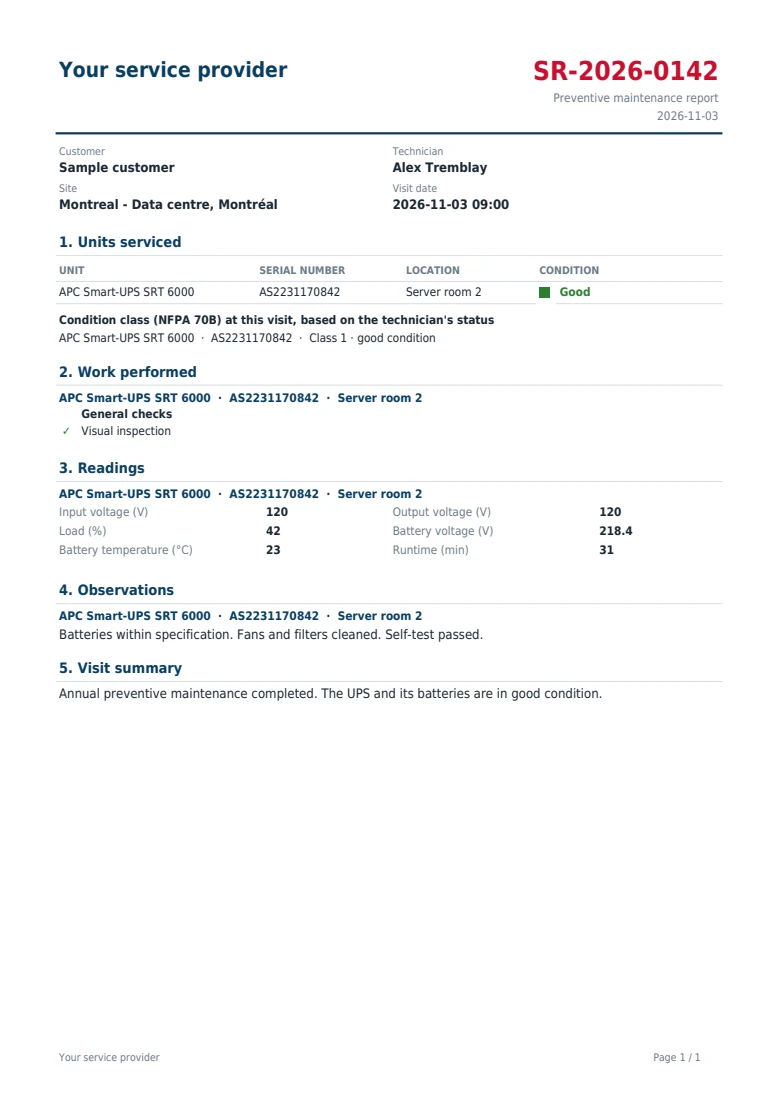
Yes. Rack PDUs, automatic transfer switches and environmental sensors from APC, Eaton, CyberPower, Tripp Lite, Vertiv and others appear in the same fleet as your UPS.
No. MayaUPS reads network cards directly over SNMP. The agent is used on servers that MayaUPS shuts down and on computers with a UPS attached by USB or serial cable.
We reply with a written proposal.